Stop retyping notes.
Start editing them.
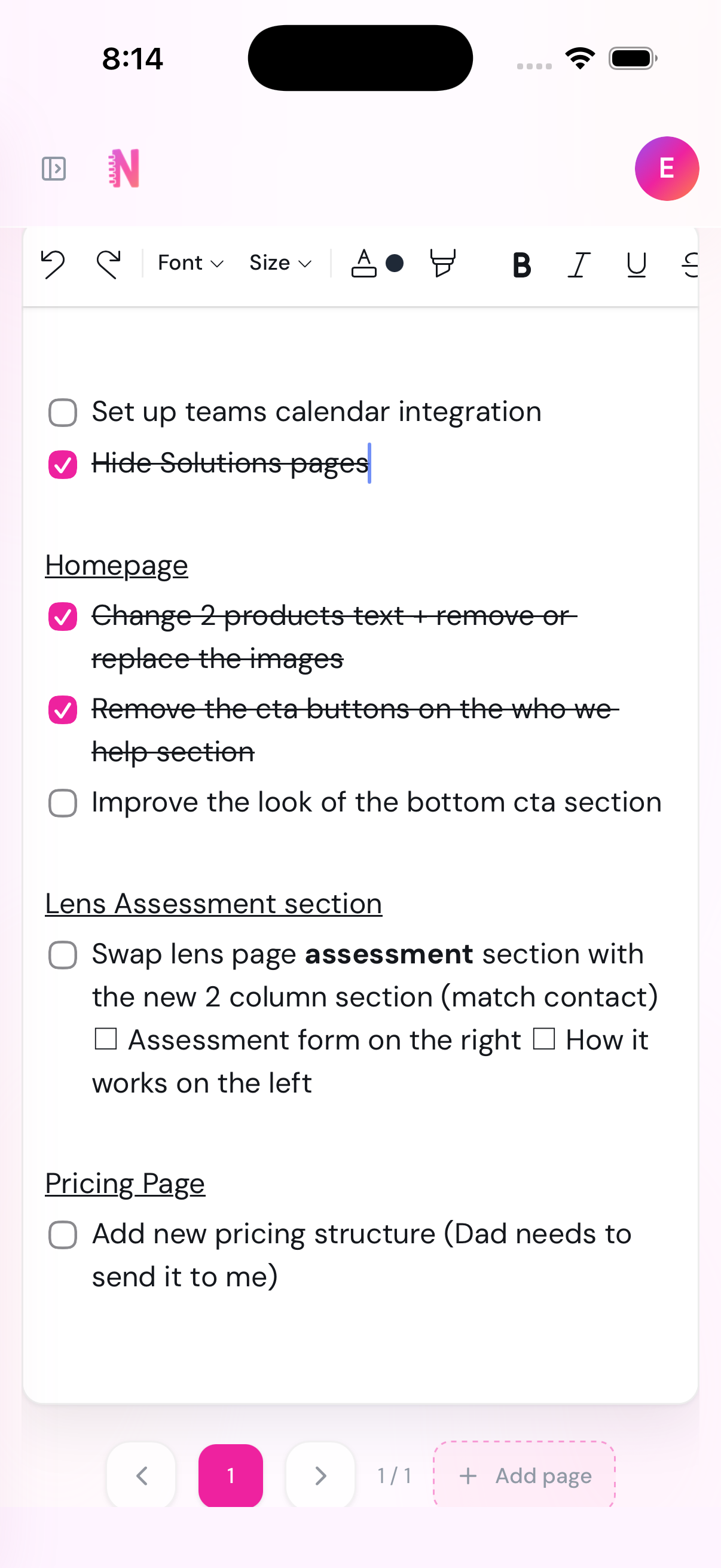
Point your camera at a handwritten or printed page. Note-ify rebuilds the headings, lists, and checkboxes as an editable note — so you keep writing instead of starting over.
What is OCR?
Optical Character Recognition
OCR turns photos of handwriting or print into digital text a computer can read.
- Reads scanned pages and photos
- Outputs selectable computer text
- Loses headings, lists, and checkboxes
- Try a traditional OCR tool
- Notice the missing structure
- Compare with Note-ify
Capture a note.
Get it back — structured.
Hit the shutter to scan the handwritten note. Watch Note-ify rebuild the headings, lists, and checkboxes — then edit the result yourself.
From paper to editable note in seconds.
Capture pages
Use your camera, photo library, or files to import one page or several at once.
- Camera capture
- Photo library
- File upload
- Single or multi-page
Rebuild structure
The OCR pipeline keeps headings, lists, and hierarchy — so the note reads the way the page did.
- Layout-aware OCR
- Hierarchy detection
- List reconstruction
- Page-aware output
Edit and export
Keep writing immediately, then export as text or PDF whenever you are ready to share.
- Immediate editing
- Searchable notes
- Text export
- PDF export
Built for real note workflows,
not just text extraction.
Structure survives the scan
Headings, paragraphs, and list items stay separated and styled — so the note reads the way the page did, not like a wall of text.
Edit the moment it lands
Skip the usual OCR cleanup loop. Every recognized block is already a live, editable element the second conversion finishes.
Multi-page notes, one document
Capture a 4-page lecture or a front-and-back meeting note as a single note with a page bar — not four notes you have to stitch together.
Find anything you scanned
Every converted page is full-text searchable, so a note from three months ago is as easy to find as one from this morning.
Export when you need to share
Download any note as plain text or PDF — for a classmate, a coworker, or your own records outside the app.
Web and mobile, same notes
Scan from your phone between classes, keep editing from your laptop at your desk. One workspace, wherever you capture.
Same scan. Very different result.
Traditional OCR gives you a wall of text. Note-ify gives you something you can actually work with.
Photosynthesis Study Notes Light Reactions and Calvin Cycle Plants convert sunlight into chemical energy through a two stage process The light reactions occur in the thylakoid membranes and produce ATP and NADPH Stage 1 Light dependent reactions Chlorophyll absorbs light energy Water molecules are split releasing oxygen Produces ATP and NADPH Stage 2 Calvin Cycle Uses ATP and NADPH from light reactions Carbon dioxide is fixed into glucose Occurs in the stroma Important Remember that oxygen is a byproduct of the light reactions not the Calvin Cycle Review chapter 7 diagrams Make flashcards for key enzymes Quiz on Friday
Different audiences.
One faster workflow.
Start free. Upgrade the moment
you need more.
The free tier is enough to build a real habit. Pro removes the limits once scanning becomes part of how you work.
Try the full OCR-to-editable-note experience — no card required.
Get started free- Up to 15 active notes
- 5 OCR scans per month
- Single-page notes
- Up to 3 notebooks
- Full editing — formatting, checklists, tags
- Images stored on-device
Billed $39.99 yearly
For anyone who scans more than a few pages a week.
- Unlimited notes
- 100 OCR scans per month
- Multi-page notes — up to 20 pages
- Unlimited notebooks
- Priority OCR processing queue
- Unlimited tags per note
- Export as PDF or Shareable text
Prices in CAD. Cancel anytime — no long-term contracts.
Why people switch from basic OCR
to a Note-ify workflow.
Common questions.
Capture once.
Edit right away.
Keep document structure, cut cleanup time, and move from scan to usable notes faster. Free to start — upgrade only once you outgrow it.
Full app at app.note-ify.ca